AI readiness: how to find out where AI fits your business
Free download: AI readiness self-check (PDF), the five questions from this guide on one printable page.
What is AI readiness?
AI readiness is how prepared a business is to use AI where it will actually pay off. Most guides measure it across dimensions such as strategy, data, technology, people and governance.
Those dimensions matter. But they all assume you already know which processes to point AI at. For most small and mid-sized businesses, that is the missing piece.
Most businesses have started. Few have got far.
AI use is growing fast. According to Eurostat (opens in a new tab), 20.0% of EU enterprises with 10 or more employees used AI in 2025, up from 13.5% in 2024.
Using AI somewhere is not the same as getting value from it. McKinsey's State of AI 2026 (opens in a new tab) found that nearly nine in ten organisations use AI regularly in at least one business function, but only 44% report it scaling across the business, and just 37% attribute any profit impact to it.
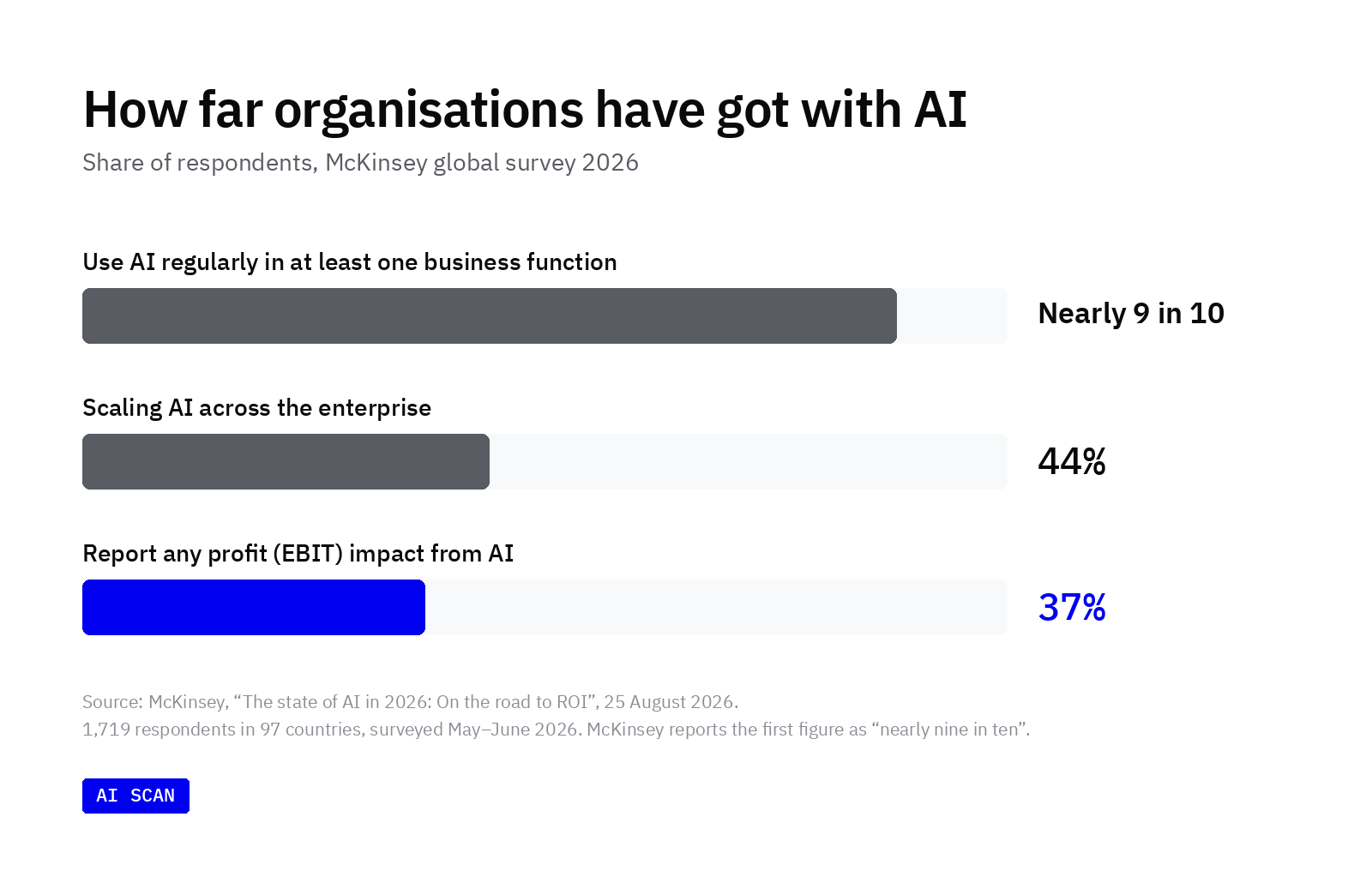
The gap is wider for smaller companies. In the same survey, one-third of organisations with under $1 billion in revenue report AI scaling across the enterprise, against 54% of larger ones.
Why the first step is usually the hardest
The honest answer to "where should we start with AI?" is "it depends on how your company actually works." That is rarely written down.
The work that would gain most from AI is often the work nobody documented: the copy-paste between two systems, the spreadsheet rebuilt every Monday, the report that takes four hours because the data arrives in the wrong format.
Signs your business needs an AI readiness assessment
An assessment is worth doing if several of these sound familiar:
- AI comes up in every leadership meeting, but nobody owns it.
- You bought AI licences and few people use them.
- You have a list of AI ideas and no fair way to compare them.
- Suppliers have pitched you tools, and you cannot tell which would pay off.
- An earlier AI trial never made it into everyday use.
- Your team clearly spends hours on repetitive work, but nobody has mapped where.
What should an AI readiness assessment tell you?
A useful assessment answers four practical questions. A score out of 100 is not one of them.
Where does the time go?
Which tasks take up most of each role's week, and which of them repeat daily or weekly. This is the raw material for every AI decision that follows.
Which processes does AI fit, and which does it not?
Repetitive, rules-based, text-heavy work is usually a good fit. Work that depends on judgement, relationships or rare exceptions usually is not. A good assessment names both.
What should we do first?
Opportunities ranked by how much they matter against how hard they are to start. One or two clear first projects beat a long list of possibilities.
What should we not spend on?
The ideas that sound promising but will not pay off, and the processes that already work well. Knowing what to skip protects the budget as much as knowing where to start.
This matches what separates the companies getting value. McKinsey's 2026 survey found that nearly three-quarters of high performers fundamentally redesign workflows (opens in a new tab) because of AI, against one-quarter of other organisations. You cannot redesign a workflow you have not mapped.
What an AI readiness assessment is not
- Not an IT audit. It looks at how work gets done, not at your servers or security setup.
- Not a tool recommendation. The output is a list of processes worth improving. Some of the fixes will not involve AI at all.
- Not a transformation programme. It is a short diagnostic that ends in a decision, not a multi-year roadmap.
- Not a performance review. It assesses processes, not people.
Workshops, surveys or AI interviews: which method works best?
There are three common ways to gather the evidence. Each suits a different question.
| Executive workshops | All-hands surveys | Conversational AI interviews | |
|---|---|---|---|
| Best for | Aligning leaders on priorities | Measuring sentiment across a large team | Finding where AI fits in day-to-day work |
| Who you hear from | Leaders and managers | Everyone, briefly | Everyone, in depth |
| What you learn | The process as leadership understands it | Opinions and ratings | The process as it is actually run |
| Follow-up questions | Yes, in the room | No | Yes, based on each answer |
| Candour | Lower: people speak in front of colleagues and managers | Medium: fixed options limit detail | Higher: one-to-one, names separated from answers |
| Time from staff | Half a day or more per person | 10–20 minutes | A few minutes a day over about 10 days |
| Time to results | Weeks, including synthesis | Days | About 10 days end to end |
| Typical cost | Consultant fees plus leadership time. Consultancies that publish prices start at around $5,000–15,000 | Low: a survey tool plus internal time to design and analyse it | From €900 + VAT, one-time (AI Scan) |
| Main limitation | Misses what happens below management | Cannot ask why | Works best when leaders explain why it matters |
How to read the table
Workshops are good for agreement at the top. Surveys are good for breadth. Neither is built to uncover the undocumented steps where most time is lost, because neither follows up on what a specific person actually does.
Conversational interviews close that gap. Each person explains their work in their own words, and the interviewer asks a follow-up when something is vague. Many companies use more than one method: interviews to find the opportunities, a leadership session to agree what to fund.
A real example: NRD Companies
NRD Companies ran an AI Scan with seven people from different departments. Interviews took place in Microsoft Teams, where the team already worked.
- Invited people interviewed
- 7 of 7
- Launch to report
- 11 working days
- Opportunities identified
- 40
- Prioritised recommendations
- 11
“Conducting interviews through MS Teams allowed colleagues to participate using a familiar platform, while the open-question format gave them room to describe their work in their own words.”
Read the full case study (opens in a new tab).
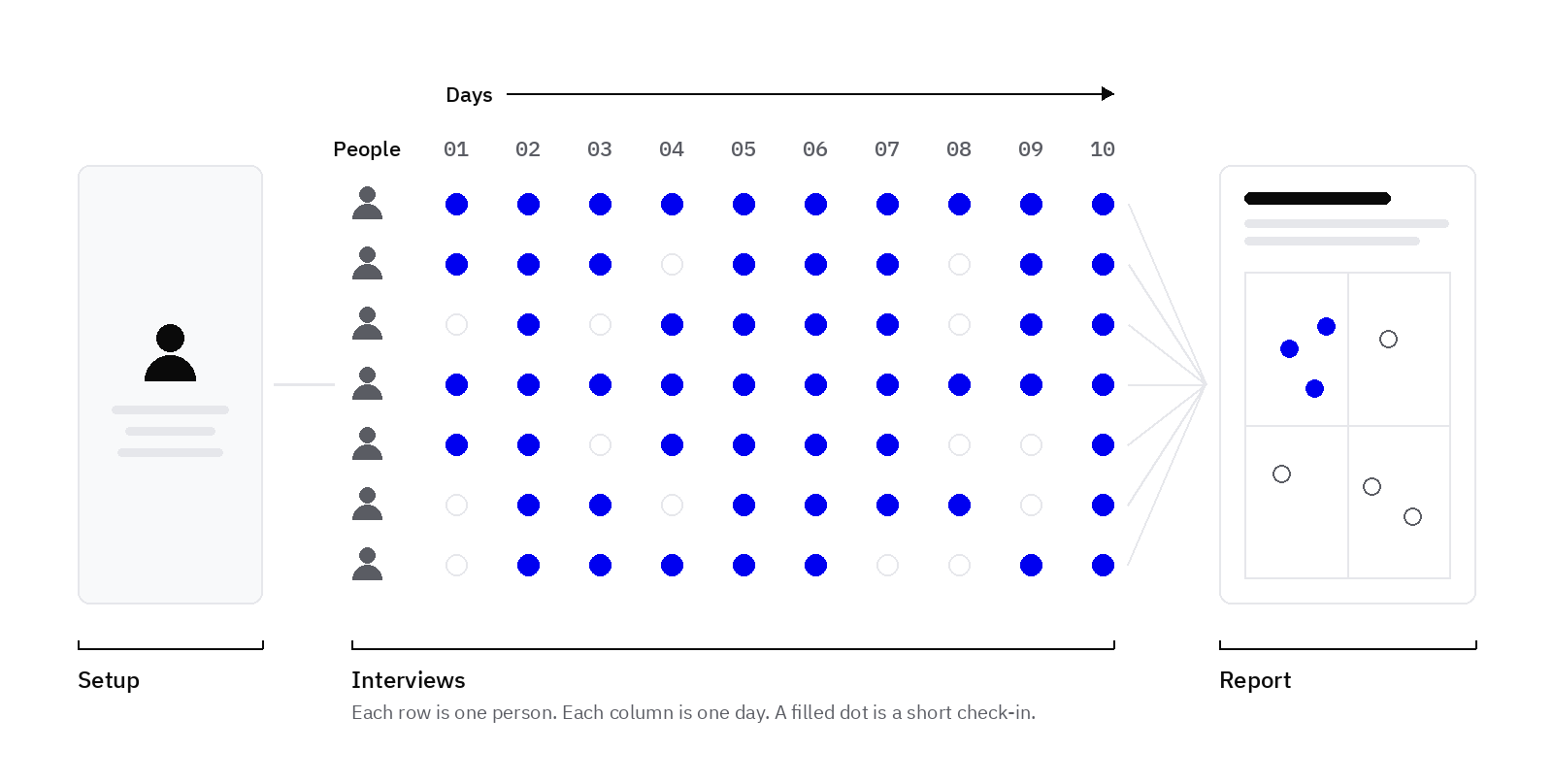
What the 10 days look like
| Stage | When | What happens | Time it takes |
|---|---|---|---|
| Setup | Before day 1 | An admin adds company context, picks participants, channel (Slack, Microsoft Teams or web app), language and schedule | About 10 minutes |
| Interviews | Around 10 days | The AI agent asks short questions and follows up where it matters | About 10 minutes a day per person |
| Report | When interviews close | Every conversation is synthesised into one ranked report | None from staff |
What it asks of your team
Each participant spends a few minutes a day answering short questions in a tool they already use. Leadership time is light. The one thing that makes a real difference: leaders telling their teams why the scan matters and encouraging them to take part.
How to run an AI readiness assessment in five steps
These steps work whether you run the assessment yourself or use a tool.
1. Set the scope
Start with one department or a handful of teams, not the whole company. A focused first round gives clearer answers and a faster decision.
2. Choose who to ask
Include the people who do the work, across roles and seniority, not just managers. Managers know the process as designed. Their teams know the process as it runs. Their experience of AI differs too: in McKinsey's 2026 survey, 47% of mid-level managers and individual contributors reported AI-related strain, against 31% of executives.
3. Explain why you are asking
Tell people the goal is to remove frustrating, repetitive work, not to assess their performance. Be honest about how answers are stored and who sees them. People share more when they trust the process.
4. Ask about the work, not about AI
Most people do not know the full range of what AI can do, so "what would you like AI to do?" gets blank looks. Ask about tasks instead:
- Which tasks take up most of your week?
- What do you repeat every day?
- Where do you copy information from one system into another?
- What would you drop tomorrow if you were allowed to?
- What gets in the way of the work you are actually good at?
Then follow up. When someone says reports take up their Mondays, ask where the data comes from, how many systems are involved and which part needs their judgement. The first answer is rarely the useful one.
5. Rank, decide and report back
Place each opportunity by impact and effort. Pick one or two to start, name what you will not pursue, and share the outcome with everyone who took part.
Quick self-check: five questions
Answer yes or no. It takes about a minute.
- Can you name the three processes where your team loses the most time?
- Do you know which of those repeat every day or week?
- Have you asked the people who do that work, not just their managers?
- Could you say which AI ideas you would not fund?
- Is one person responsible for deciding what to try first?
If you answered no to two or more, start with an assessment before buying tools or funding a build. If you answered no to one, close that gap first, then pick a project. If you answered yes to all five, you are ready to pick a first project.
How much does an AI readiness assessment cost?
Costs vary widely. Among consultancies that publish their prices, AI readiness assessments typically start at around $5,000 to $15,000 for two to four weeks of work. Larger engagements are quoted per project.
AI Scan uses fixed, one-time pricing based on how many people take part. There is no subscription, and results arrive in around 10 days.
| Tier | Participants | Price (excl. VAT) | Best for |
|---|---|---|---|
| Essential | Up to 15 | €900 | One team or department |
| Standard | Up to 30 | €1,900 | Most companies |
| Broad | Up to 50 | €3,500 | Several teams at once |
| Enterprise | More than 50 | Quoted | Larger organisations |
VAT is calculated from your location at checkout. Invoice and purchase-order payment are available. See current pricing for the latest details.
Frequently asked questions
How do I know if my company is ready for AI?
If you can name the processes where your team loses the most time, and which of those are repetitive, you are ready to start. If you cannot, that is the first thing to find out.
How long does an AI readiness assessment take?
It depends on the method. Workshop-led assessments often run for several weeks including synthesis. An AI Scan takes around 10 days end to end, with about 10 minutes of setup.
Do we need clean data before we start?
No. Data quality matters when you build an AI solution, not when you work out where one would help. The assessment itself shows which data problems are worth fixing first.
Will employees be honest with an AI interviewer?
People tend to speak more openly in a one-to-one chat than in a group workshop, especially when their name is not attached to their answers. Anonymity is not absolute, though: in a small team, a specific example may still be recognisable.
What is the difference between AI readiness and AI maturity?
Readiness asks whether, and where, you should start. Maturity measures how far along you are once AI is already in use.
Is our data used to train AI models?
Not with AI Scan. Interviews run on Microsoft's Azure OpenAI inside a private environment, so conversations never reach ChatGPT or OpenAI and are not used to train AI models (opens in a new tab).
What if the assessment says AI is not the answer?
That is a useful result. Some processes are better fixed with simpler software, a clearer handover or cleaner data. A good assessment says so and explains why. In AI Scan, these sit in their own report section: the ideas deliberately parked and the work that already runs well.
See what an assessment looks like
The quickest way to judge whether an AI readiness assessment is worth it is to see a real output.
- Explore the sample report (opens in a new tab): the opportunity map, recommendations, process inventory and what not to spend on, in full.
- Read the NRD Companies case study (opens in a new tab): a real scan in Microsoft Teams, start to finish.
- Talk to the team: questions about scope, languages or larger rollouts.
- Download the free self-check: five questions and a time-sink worksheet on one page, to use with your team.
Sources
- 20% of EU enterprises use AI technologies (opens in a new tab), Eurostat, 11 December 2025
- The state of AI in 2026: On the road to ROI (opens in a new tab), McKinsey, 25 August 2026
- Data, privacy and security for Azure OpenAI (opens in a new tab), Microsoft Learn
- AI Scan pricing and FAQ, checked 19 November 2026
- NRD Companies case study